Full-page feature highlights founder Dr. Angela Zeng’s approach to combining traditional wellness principles with modern nutrition
Saint Louis, MO, United States, 17th Oct 2026 – Karviva, the functional beverage company founded by Dr. Angela Zeng, is featured in the 2026 USA TODAY Food as Medicine special edition, with a full-page feature appearing on page 23 in both the digital and print editions. According to information provided by USA TODAY, approximately 250,000 printed copies of the special edition are expected to be in circulation. The feature highlights Dr. Zeng’s background as a medical scientist, her family’s generations-long connection to Traditional Chinese Medicine, and the thinking behind Karviva’s whole-plant beverage portfolio.
The feature, titled “Why a Medical Scientist Built a Gentler Cleanse,” explores Dr. Zeng’s personal and professional path and the ideas that led her to create Karviva. It highlights the company’s use of whole-plant ingredients, including fruits, vegetables, sprouts, herbs, and botanicals, as well as its approach to developing juice products without added sugar or harsh laxatives.
Dr. Zeng founded Karviva after combining her scientific training with the traditional wellness practices she grew up around. Her background includes a Ph.D. in Pathology and training in evidence-based nutrition, while her family history introduced her to Traditional Chinese Medicine from an early age.
“A cleanse should not feel like a punishment,” said Dr. Angela Zeng. “It should give you space to hydrate, simplify your meals, and pay attention to what your body needs.”
The USA TODAY appearance adds to a series of recent milestones for Dr. Zeng and Karviva. Dr. Zeng’s debut book, The Balance Cure: The TCM Way to Lasting Weight Loss, has reached the No. 1 bestseller position in Amazon’s Holistic Medicine category. The book explores Traditional Chinese Medicine alongside modern nutrition and introduces readers to five TCM body patterns, self-assessments, seasonal observations, recipes, and lifestyle reflections.
Karviva has also recently received recognition from Good Housekeeping, with the company’s Profit Cacao Whole Plant Protein & Prebiotic Smoothie selected as a winner of the 2026 Snack Awards. The recognition followed evaluations by the Good Housekeeping Institute Nutrition Lab and consumer testing as part of the award program.
The new USA TODAY feature offers readers a closer look at the founder behind Karviva and the ideas that continue to shape the company’s approach to functional beverages.
About Dr. Angela Zeng
Dr. Angela Zeng, Ph.D., MBA, is a food scientist, Traditional Chinese Medicine scholar, and founder and CEO of Karviva. Born into generations of Chinese herbal practitioners and trained in pathology, biochemistry, and evidence-based nutrition, she combines traditional wellness principles with modern nutritional science through her work as an entrepreneur, author, and speaker. She is the author of The Balance Cure: The TCM Way to Lasting Weight Loss.
About Karviva
Karviva is a St. Louis-based functional beverage company founded by Dr. Angela Zeng. Inspired by Traditional Chinese Medicine and modern nutritional science, the company develops plant-based beverages using whole-food ingredients, botanicals, and prebiotic fiber. Its portfolio includes juices, protein smoothies, hydration beverages, and other functional drinks.
Financial technology company opens its app in more than 50 countries during FLOW Summit as 500-plus builders develop AI and Web3 products
BANGKOK, Oct. 17, 2026, ZEX PR WIRE —U-topia, a financial technology company building a self-custody app for everyday money movement, has opened its public beta in more than 50 countries. The company announced the launch at FLOW Summit 2026, held Oct. 15-16 at Avani Sukhumvit Bangkok, five years after U-topia was founded.
More than 700 people attended the two-day launch, including technology entrepreneurs, developers and community members from several countries. The program combined U-topia product demonstrations and company updates with U-Hackathon, a global build program focused on practical AI and Web3 products.
“Five years ago, I set a simple standard: if my mother could not use the product without calling me for help, it was not ready,” said Emmanuel Quezada, founder and CEO of U-topia. “Opening the beta with people from around the world, while hundreds of builders were creating new tools beside us, brought that idea to life. Our goal is to make moving money as simple as sending a message while keeping people in control.”
A public beta designed around everyday use
U-topia is designed to let eligible users hold, send, spend, convert and withdraw digital and everyday currencies through one mobile app. Users can send funds to another U-topia user through a U-Tag, a simple @name that replaces a long wallet address. The company says funds remain under the user’s control rather than being held by U-topia.
The public beta follows private alpha and closed beta testing with community members and ambassadors. Feature availability varies by country. Account opening, card issuance and transactions remain subject to age requirements, identity verification, partner rules and local law. U-topia is not a bank or card issuer; card and local currency services are provided through licensed partners where available.
U-Hackathon brings global builders to Bangkok
FLOW Summit also hosted U-Hackathon on Oct. 15-16. Organizers said the event attracted more than 500 hackers and builders from around the world. Teams worked through a 24-hour build period with product, engineering and design mentors before presenting working prototypes in two tracks: artificial intelligence and Web3. The program extended the app launch into a working forum for new products, technical collaboration and international builder participation.
The competition recognized three teams in each track. Organizers valued the combined awards at more than 2.5 million Thai baht, including the advertised THB 1 million core prize pool, partner bounties and technology credits. UBotPay, an AI-powered payment agent built for Web3, won first place in the Web3 track. U-Reach, an AI-powered marketing, sales and customer relationship management platform, took first place in the AI track.
U-Hackathon was sponsored by ElevenLabs, Tokenomist AI and DTC Group, in association with Avalanche, Team1 Thailand, Yellow.com, ContributionDAO, CUBS Chula and Hooray. Judges selected projects on merit, and members of the U-Center DAO community voted live for the grand prize.
The summit also included a preview of U.bot, a related AI venture from members of U-topia’s founding team. U.bot is being developed as a user-controlled orchestration layer that can select among AI models and coordinate specialized agents. Its long-term roadmap aims to create a more capable personal AI experience with characteristics the team associates with superintelligence; those advanced capabilities are planned and are not currently available.
About U-topia
Founded on Oct. 16, 2021, U-topia is a financial technology company building a self-custody mobile app intended to help people hold, send, spend, convert and withdraw digital and everyday currencies while retaining control of their funds. U-topia is not a bank and does not issue cards. Availability and features vary by country and are subject to partner requirements and local law. Learn more at www.u-topia.com.
Civil servant, researcher and AI pioneer tells the 3rd World AI Summit, Bengaluru, that people-first, sovereign AI can make India a global AI leader
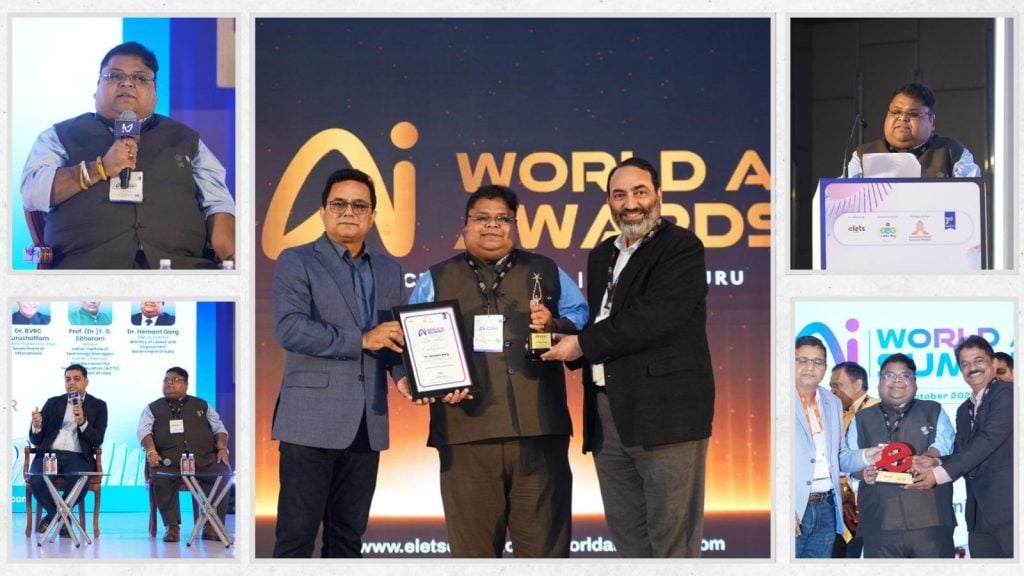
Bengaluru, India, 16th October 2026, ZEX PR WIRE — Dr. Hemant Garg, Deputy Director (Legal), Employees’ State Insurance Corporation (ESIC), Ministry of Labour and Employment, Government of India, received the “Excellence in AI for Public Policy” award at the 3rd World AI Summit in Bengaluru on 14–15 October 2026, placing an Indian public-policy voice at the centre of the global debate on how AI should serve people.
Dr. Garg described all of his work, from AI agents for government to AI-led labour law outreach, as an effort to help realise Hon’ble Prime Minister Shri Narendra Modi’s vision of Viksit Bharat@2047, under the leadership of Hon’ble Union Labour and Employment Minister Dr. Mansukh Mandaviya, whose Shramev Jayate reforms, Labour Codes and Ease of Doing Business drive set the direction. The goal, he said, is an Atmanirbhar Bharat in AI, built on a Bharat AI Stack: Indian large language models such as Sarvam, the Bhashini platform serving citizens in their own languages, and home-grown agents and talent under the IndiaAI Mission, taking India into the global AI league.
Held with Digital India, the National e-Governance Division (NeGD) and the Karnataka Digital Economy Mission (KDEM) as partners in Bengaluru, India’s startup, IT and now AI capital, often called India’s Silicon Valley, the Summit was themed “AI for All: Accelerating India’s Journey Towards Inclusive, Responsible and Future-Ready AI”.
The award honours his creation in 2023 of “IFSCA Karmayogi”, the first AI agent at the International Financial Services Centres Authority (IFSCA), GIFT City, and his research on AI in anti-money laundering, the Labour Codes and algorithmic management of gig workers.
On the panel “AI for All – India’s Journey to a Sovereign, Inclusive AI Future”, with Shri Aman Mittal, IAS, Dr. BVRC Purushottam, IAS and Prof. (Dr.) T. G. Sitharam, former Chairman, AICTE, moderated by Dr. Ravi Gupta, Dr. Garg said inclusive AI must include the worker, and that India can blend Europe’s rights-based approach, US-style audits and Singapore’s skilling model through its Labour Codes, the DPDP Act and e-Shram.
His keynote, “AI, Employment & Skills: Building a Future-Ready Workforce for India”, presented as “From Files to Foresight”, began with a worker disabled in an accident, or a family that has lost its breadwinner, whose care and pensions depend on ESIC, EPFO, the Ministry of Labour and Employment and the National Health Authority. “The true test of AI in government is how quickly that family receives its benefits, and whether it is treated with dignity on the way,” he said.
He traced three waves of governance: e-Governance, which put paper online; Digital Governance, built on India’s digital public infrastructure; and now AI-enabled Intelligent Governance, where benefits reach eligible citizens without their having to apply.
Dr. Garg propounded that AI will change tasks first, then jobs, then institutions and the workforce, and called for institutions for AI governance, impact assessment and exposure mapping to curb job attrition, support reskilling and compensate workers in transition. e-Shram, ESIC and EPFO, now reaching gig and platform workers, can extend social security to those left out, while indigenous models such as Sarvam and Bhashini can grow home-grown AI talent under the IndiaAI Mission.
Government AI, he said, must be lawful, explainable and accountable; “a pattern is not proof”; and India must guard against a new colonisation “not by ships, but by servers”. He proposed “Five Ts”: Trust, Transparency, Talent, Thin and safe data, and Tested-then-scaled.
An LLB, LLM and Ph.D., and an IIT Delhi CTO Programme alumnus with nearly two decades in public service, including Punjab’s Department of Cooperation, Dr. Garg has researched digital governance in governments and cooperatives extensively; his work is published internationally, taught in universities and presented at Oxford, Harvard and Cambridge.
“Not artificial intelligence replacing governance, but intelligent governance that remains deeply human,” he concluded.
ShippingContainersNow.com has launched an upgraded online store offering certified new and used shipping containers with 48-hour dispatch from 15 regional depots, alongside turnkey container offices, refrigerated units, and container pool installations shipped to all 50 states in the USA.
Los Angeles, California, United States, 17th Oct 2026 — Buying a shipping container used to mean calling around to depots, waiting days for a quote, and hoping the delivery company showed up on time. ShippingContainersNow.com was built to change that.
The company, which has been operating since 2016, has upgraded its online store to let customers across all 50 states browse, select, and order containers directly — without the back-and-forth. Inventory includes 20ft and 40ft units in new and used condition, refrigerated containers, open-side models, container offices, and container pools, with most orders dispatched within 48 hours of purchase.
“We kept hearing the same thing from customers — they didn’t know where to start, or they’d get a quote and then hear nothing for a week,” said James Harlow, Founder and CEO. “We wanted to fix that. You should be able to buy a container the same way you buy anything else online — see what’s available, know what it costs, and get it delivered.”
The site currently lists over 100 container options across multiple grades and configurations. Every unit is wind and watertight (WWT) certified and inspected for structural integrity before it ships. Customers also get a tracking link once their order is dispatched and a call from the driver before delivery — something Harlow says his team added after customer feedback.
Delivery is handled through a network of 15 regional depots across the country, which keeps rates lower than competitors working out of a single location. Larger orders can be moved via rail freight for bulk purchases.
Beyond standard storage containers, the company also supplies refrigerated conex units for cold-chain storage, modular container offices built out with insulation, electrical, and HVAC, and container pools that arrive ready to connect and fill. Harlow says demand for the conversion side of the business has grown steadily over the past two years.
“People are getting creative with these things,” he said. “We’ve sold containers that became farm offices, pop-up shops, event bars, and backyard pools. The storage side is always steady, but the conversion requests keep growing.”
The company’s blog also covers buying guides, size comparisons, price breakdowns, and delivery tips — aimed at first-time buyers who aren’t sure where to start.
ShippingContainersNow.com can be reached at sales@shippingcontainersnow.com. The full product catalog is available at https://shippingcontainersnow.com/shop.
New Live Mode brings webcam face tracking, gamepad control and live physics into Moho, so a model can be drawn, rigged and streamed without leaving the app.
United States, 17th Oct 2026 – Lost Marble LLC, developers of Moho Animation Software, today released Moho 14.5 SHOWTIME, a free update for all Moho 14 owners.
The main addition is Live Mode, which drives a rigged character in real time from webcam face tracking, gamepad input and Moho’s physics engine, then sends the result straight to the new Moho Virtual Webcam or to be used with recording and live streaming, such as OBS. Because Live Mode runs on Moho’s existing rigging system, a character already built in Moho can be made live without rebuilding it.
“Moho SHOWTIME started as a simple experiment to move characters with a gamepad, but the potential was so clear, and it was so much fun to play with, that we ended up developing an entire live animation system,” says Víctor Paredes, co-founder of Lost Marble. “If you know how to create a Smart Bone, then you know how to create a live scene or VTuber model.”
A new world for animators. A dream for VTubers
Building a VTuber model conventionally means moving between applications: one to draw, one to rig, another to handle tracking, a third to get the result into a stream. Each handoff costs setup time and limits what the finished model can do.
In Moho 14.5, all of it happens in one place, and every Moho feature stays available inside the live model: particles, physics, blending modes, vector interpolation, boiling brushes, layer effects and more. A combination that is hard to achieve in a conventional VTuber pipeline.
Developed with the animators in mind
Moho 14.5 SHOWTIME is its biggest free update ever released. Among its many new features, SHOWTIME comes with a long list of improvements and new features, including big improvements to the drawing tools, a fully remade Paint Bucket, dozens of quality of life changes, a big boost in performance, new export options, Magnetic Onion skins and “Shift & Trace”, new options for Liquid Shapes, better Batch Exporter, EXR and PNG export with color profiles, improved video tracking, Categories for custom brushes and more.
“With this free SHOWTIME update we wanted to give Moho users the version the community asked for,” says Mike Clifton, co-founder of Lost Marble. “Many of the new features and improvements come directly from listening to our users, and we think they will enjoy both the big and the small changes.”
One time purchase and no generative AI
Following its No gen AI stance and one time purchase model, Moho 14.5 SHOWTIME confirms the software will continue improving by listening to the artists, being innovative and looking for new ways to think 2D animation.
New users can pick between two versions: Moho Pro and Moho Debut: Moho Pro 14.5 can create and stream Moho Vtuber Models and is available for purchase at $399.99, while Moho Debut 14.5 can open and stream Moho Vtuber Models and is available at $59.99.
Lost Marble’s award-winning Moho software has become the animation tool of choice for countless professionals and studios worldwide. From its beginnings as a hobbyist project to its current role empowering thousands of artists, Moho combines state-of-the-art rigging and animation technology with professional-grade tools, helping creators bring their stories to life with power, precision, and ease.
Edinburgh SEO and AI Search expert Robbie Allen has launched robbieallen.co.uk, a personal site that documents 15 years in search, the services he delivers through Mostro and GRAFTS.IO, and results from client campaigns.
United Kingdom, 17th Oct 2026 – Robbie Allen, an Edinburgh-based SEO consultant and co-founder of the AI SEO agency Mostro, has launched robbieallen.co.uk, a personal website documenting his 15 years in search engine optimisation and online marketing.
The site sets out the services he delivers, results from client campaigns, a career timeline, a key facts table and answers to common questions, and links to the two agencies he runs.
The site is built as a single reference for the people who look him up. Founders, marketing leads and the investors they pitch now check a consultant on Google and in AI assistants such as ChatGPT before a first call. robbieallen.co.uk gives those searches a first-party source, written in plain facts and marked up with structured data so that search engines and AI assistants can read it.
“People search a name before they trust it,” said Robbie Allen. “Founders, marketing teams and the investors they are pitching all look you up on Google and ask ChatGPT who you are. I wanted to build a website that answers that in plain, verifiable facts instead of leaving it to directories and other people who share my name.”
The homepage follows the same structure Allen uses for client about pages: an entity definition, six services, the differences between his approach and an in-house SEO hire or a generalist agency, who he works with, the story behind his career, how he works, a key facts table and six frequently asked questions. Facts on the page include his base in Edinburgh, his start in SEO in 2011, the founding of Mostro in 2023 with co-founder Collin Armstrong, and GRAFTS.IO, the marketing agency for hair transplant clinics he founded in 2026.
Client results published on the site include 60% more visitors not searching by brand name in the month a direct lithium extraction technology company’s new site launched, a rise of more than 750% in Google visitors, from a small base, for an aerospace company developing a personal eVTOL aircraft, and 32% more revenue from Google search in 75 days for a wedding flower rental ecommerce brand.
Through Mostro, Robbie Allen works with founder-led companies in 90-day sprints alongside their in-house marketing teams, with a focus on companies raising retail capital under Regulation A+ and Regulation Crowdfunding, pet brands and ecommerce brands with 1,000 or more SKUs. Mostro is headquartered in Edinburgh, takes on no more than 12 clients at one time and has no account managers or junior staff.
“Before anyone invests in a company or buys from it, they search Google and ask ChatGPT,” Allen said. “That is the work I do for clients every day, and this site is the same work done for myself.”
Robbie Allen from Edinburgh has worked in SEO since 2011. From 2020 to 2022 he built a B2B gifting and merch business that shipped more than 25,000 boxes and supplied technology, ecommerce and games companies, and he was named Pivot Entrepreneur of the Year for Scotland and Northern Ireland at the Great British Entrepreneur Awards.
About Robbie Allen Robbie Allen is an AI search and SEO expert based in Edinburgh, Scotland, and the co-founder of Mostro, an AI SEO agency for founder-led companies with in-house marketing teams. He has worked in SEO since 2011, co-founded Mostro in 2023 and founded GRAFTS.IO in 2026. He was named Pivot Entrepreneur of the Year for Scotland and Northern Ireland at the Great British Entrepreneur Awards.
The new site sorts AI writers on Medium by topic and pairs the directory with short guides on how to judge a writer before following.
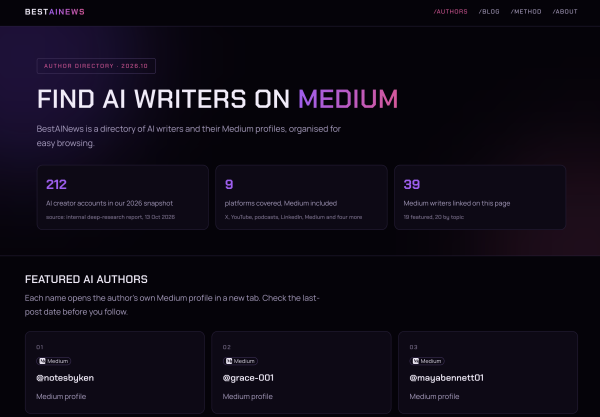
United States, 17th Oct 2026 — BestAINews has launched as a directory of AI writers on Medium, built for readers who want to follow AI news through the people who write about it in depth. The site opens with a featured list of authors, groups more writers by topic, and links each card to the author’s own Medium page.
AI news no longer comes from a handful of outlets. It is spread across X threads, YouTube channels, podcasts, LinkedIn posts and long-form essays, and much of it comes from individual creators. Short posts are easy to scan; longer analysis is harder to find. For readers who want that depth, the challenge is deciding whose writing to follow, and whether a writer is still publishing at all.
Why Medium, and how the directory is organized
BestAINews starts from that wider picture. Its research notes look at where AI creators publish and which subjects draw the most attention, from machine-learning engineering to generative AI.
The directory then focuses on Medium, a natural home for long-form AI writing. Beyond the featured list, writers are sorted into sections such as GEO and AI visibility; product, growth, pricing and GTM; and enterprise agents and builders.
Readers who want to judge an author for themselves can use the site’s guides on reading creator metrics, or a five-point check that asks whether a profile belongs to a person or a publication, when it last posted, and whether its topic stays consistent.
Two featured writers, two kinds of AI writing
Among the featured authors, Ken follows AI products and industry moves, the kind of commentary readers look for when a new model or feature ships. A recent essay, An AI Left a Note for Its Next Self, examines why handoff notes between AI agents need traceable records.
Grace takes a more hands-on angle, writing guides for everyday users choosing AI tools. One example is Open-Source AI Video Generators: How to Compare Models, Weights, Licenses, and Hardware. Both sit alongside the topic sections on the BestAINews homepage, where readers can browse every author card.
The site is built for readers who follow AI news every day, content and marketing teams looking for topic ideas and industry viewpoints, and researchers and developers tracking a specific area of AI.
“AI news isn’t in short supply. Attention is,” said james Founder, BestAINews. “Most readers don’t need another feed. They need a clear picture of who is writing about AI, and a quick way to judge a writer for themselves. We built BestAINews as that starting point, and we leave the final call to the reader.”
About BestAINews
BestAINews is a directory of AI writers on Medium. It organizes curated authors by topic, links each card to the writer’s own Medium profile, and publishes guides on reading creator metrics and checking a writer before following. Learn more at bestainews.org.
United States, 17th Oct 2026 – Personal branding expert Mark Bailey and trial lawyer Jobeth Bowers have released their book, The Athlete Brand Blueprint: Building So Retirement From The Field Isn’t Retirement From Life. Written for professional athletes, the book explains how to build a personal brand, grow an audience, and create business opportunities that continue long after their playing days are over.
Most professional athletes retire from competition long before they reach traditional retirement age. The Athlete Brand Blueprint examines what comes next and why athletes should begin preparing while they’re still playing. The authors explain how to stay connected with fans, build valuable business relationships, and use the recognition earned during an athletic career to pursue new income streams.
The book goes beyond financial planning. Bailey and Bowers encourage athletes to consider their interests, values, and ambitions when deciding what to do after their playing careers. They discuss ways to build a public presence, make business connections, and pursue opportunities that align with each athlete’s goals. Whether just beginning a professional career or preparing to leave the field, readers will see why planning for life after sports shouldn’t wait until the final game.
Mark Bailey is an NFLPA-certified contract advisor and co-owner of 1st Down Sports, an athlete representation and personal branding agency. A former college football coach, Bailey understands the demands placed on athletes and works with them to develop business interests and careers beyond professional sports.
Jobeth Bowers is a trial attorney, NFLPA-certified agent, and member of 1st Down Sports. He founded Bowers Law, a Maryland-based litigation firm, and has spent decades building and operating businesses. He also serves on the boards of several organizations and nonprofits. His experience includes business development, entrepreneurship, and professional networking.
Mark Bailey and Jobeth Bowers are available for interviews.
Title: The Athlete Brand Blueprint: Building So Retirement From The Field Isn’t Retirement From Life
Spain, 17th Oct 2026 – Founded in Málaga southern Spain with a clear vision to assist Spanish, European and international clients with complex customs clearance and international trade operations involving Spain and Europe, Gorian Aduanas has developed a specialist tailored approach built around knowledge, strategy and tailored solutions rather than routine paperwork.
Customs clearance is often described as an administrative process, and they would not be mistaken to think this: prepare the documents, submit the declaration, pay the applicable duties and taxes, and release the goods. Move onto the next! For straightforward and simple shipments, that may be all that is required. But international imports are not always straightforward and when we introduce high valued items together with tax exemptions, they are far from simple.
A six-figure yacht arriving from outside the European Union, a high value sports car requiring EU technical, legalisation and registration procedures, a collection of artworks entering Spain for an exhibition, a family relocating their permanent residence to Spain with personal belongings, or a technically controlled product requiring licences, certificates and coordination with different authorities can involve considerably more than completing a customs declaration.
This is the environment in which Gorian Aduanas thrives in and has built its reputation to date.
The company provides authorised customs representation and specialist solutions for international operations involving Spain and European markets, with experience across several specialist areas including; yachts and recreational craft, luxury and sports vehicles, works of art, transfer of residence and relocation to Spain, controlled goods, technical imports and complex international transport projects.
The common denominator is not the product. It is the complexity of the operation.
That principle sits at the heart of Gorian Aduanas.
As a company Gorian does not attempt to specialize or cover every possible product or every possible sector. Instead, it focuses on the areas where it has developed genuine specialist knowledge and experience, particularly where customs clearance intersects with the afore mentioned areas and requiring technical documentation, import taxation, regulatory requirements, logistics or other specialist procedures. This distinction is important.
The value of a customs specialist is not simply measured by how quickly a declaration can be submitted. In more complicated operations, the real value lies in understanding how the operation should be structured before the declaration is ever made. What documentation is required? Which customs procedure is appropriate? Are there exemptions or reliefs that may apply? How should the goods be valued? Are there technical or regulatory requirements that need to be dealt with first? Which authorities may need to become involved? Does the proposed route make sense from a customs and tax perspective? These are the questions that can determine whether an international import becomes a well-planned operation or a costly problem.
From a clear vision in Spain to a wider international reach
Gorian Aduanas was founded in Málaga in 2022, but its geographical vision was established from the outset. The intention was not to create a company serving only its immediate local market. The objective was always to develop the capabilities and specialities to assist clients throughout Spain, while also supporting international clients whose customs and international trade operations involve Spain and European markets. That wider reach was quickly developed as the company grew and clients learned of their unique skillsets.
Today, Gorian Aduanas serves clients throughout Spain and works on international customs projects where Spain forms part of a wider European operation. Its origins in Málaga remain an important part of the company’s history, but Málaga was the starting point, and was never going to be the boundary. The same philosophy applies to its professional network.
Over the years, Gorian Aduanas has built relationships with experienced professionals across different specialist fields. When a particular project requires expertise beyond customs clearance itself, the company can bring the appropriate specialist into the operation and coordinate the different elements around the client’s requirements. The objective being simple: the client should not have to work out independently who needs to be involved or how the different parts of the operation fit together.
Goran’s foundations were firmly set in the nautical sector
Although Gorian Aduanas is not exclusively a nautical customs clearance agency, yachts and recreational craft represent a very large and important part of its specialist portfolio and have played a significant role in shaping the company’s technical approach.
The story goes back to the beginning of 2012, when the company’s director established a business focused on marine surveying and European CE inspection of recreational craft. As a qualified marine surveyor, he developed specialist knowledge of vessels and their technical documentation before working with select Notified Bodies and subsequently moving into the European CE inspection field for recreational craft. That experience became particularly valuable when Gorian Aduanas was established a decade later.
The customs company was not simply a continuation or merger of the earlier business. Rather, the knowledge, experience and practical understanding developed through that work became part of the foundation on which Gorian Aduanas was built, alongside newly incorporated customs representation expertise. This combination created an unusual perspective. Gorian could approach a yacht import not only from the customs viewpoint, but with a full understanding of the vessel itself and interpretation of its documentation.
Where customs knowledge meets nautical knowledge
The benefit of this approach became increasingly apparent through work with yacht owners, captains and other clients importing vessels into Europe. Clients could sometimes find themselves dealing with customs representatives who understood the standard customs process but had little to no understanding of the nautical sector or the vessel itself, putting at risk the customs process altogether.
Yacht documentation has its own technical peculiarities. Understanding how that documentation should be interpreted and presented effectively to customs authorities can affect the way an import operation is approached. The vessel’s technical characteristics, history, ownership, intended use and supporting documentation can all be relevant.
In many cases, the difficulty was therefore not simply a question of preparation or communication. It was the absence of specialist knowledge capable of connecting the nautical and customs aspects of the operation. Gorian made sure that they could communicate effectively, and more importantly technically, with all members involved in the process. It is in this area in which Gorian Aduanas developed a particular strength.
The company has assisted clients and captains with permanent yacht imports, Temporary Admission for yachts and recreational craft, customs clearance and tax procedures, technical documentation and European CE-related requirements, among other operations. Its director’s background in marine surveying and recreational craft CE inspection also means that technical yacht documentation can be approached from a perspective that goes beyond simply checking whether a document has been attached to a customs file, but actually understanding the document that is being presented and its contents. This is often beneficial when a “non-marine orientated” customs authority is questioning documentation or details, Gorian can explain the documents to the official and lead him to the answers he seeks, without having to delay the process by going back to the client with the officials’ questions.
For recreational craft requiring CE compliance work, Gorian’s technical capability includes inspection and preparation of the relevant technical file, working within the European conformity assessment framework and with the appropriate Notified Body involved in the certification process. That technical foundation has become an important part of the company’s wider customs approach.
Not just yachts: specialist bespoke solutions across high value and technically demanding imports
While the nautical sector remains core pillar of Gorian Aduanas’ activity, the company’s specialist work extends well beyond boats.
One important area is the importation of luxury and sports vehicles, particularly where a vehicle arriving from outside the EU requires more than a standard customs declaration. Depending on the vehicle and the circumstances, the operation may involve customs valuation, import taxation, technical documentation, homologation, registration requirements, certificates or other procedures before the vehicle can be legally used in Spain.
The same principle applies to works of art and cultural items. Gorian Aduanas has assisted with the importation of paintings, sculptures and other artworks for exhibitions, galleries, public institutions and private individuals. These operations can involve temporary imports, ATA Carnets, definitive imports and the correct application of customs and tax treatment depending on the circumstances.
Another core specialist area is transfer of residence and relocation to Spain. For individuals moving to Spain from outside the European Union, the importation of personal belongings and vehicles, in qualifying circumstances, vehicles can involve specific customs procedures and potential relief from import duties and taxes. This is a process that must be solicited by the customs clearance representative on your behalf, done incorrectly by a less or non-experienced person, import taxes might be claimed!
These operations require more than arranging transport. The individual’s circumstances, dates, ownership history, documentation and eligibility for the relevant reliefs need to be considered before the shipment is structured. Gorian Aduanas customs clearance has assisted clients with these relocation operations, including cases involving substantial personal assets, vehicles and household belongings that can run into the hundreds of thousands of US Dollars in value. Especially when yachts, aircraft or multiple cars are involved.
The company also works with controlled and technically demanding goods, where customs clearance may require coordination with other government departments, inspectors or regulatory authorities. This can include products requiring licences, certificates, technical documentation or specific approvals, as well as merchandise subject to additional sanitary, quality-control or regulatory requirements. In these situations, customs are only one part of the operation.
A good solution begins way before the customs declaration is prepared
This is one of the fundamental differences in the way Gorian Aduanas approaches its work. The starting point is not normally a form. It is a detailed conversation.
The company first seeks to understand what the client is trying to achieve, what is being imported or exported, where it is coming from or where it is going, who owns it, what documentation exists and what particular circumstances and details surround the goods that may affect the operation. The documentation is then studied to identify the applicable customs and tax position, potential problems, missing information and possible solutions. Only after that assessment can a sensible strategy be established and laid out to the client in writing.
In some operations, the correct solution may seem straightforward. In others, it may involve several phases, different authorities, technical specialists, transport providers, customs procedures or supporting documentation. The objective is not to create unnecessary complexity, quite the opposite, it is to identify and understand the right complexity before it becomes a problem. This approach also means looking carefully at the benefits available under the applicable rules or laws.
Import duties and taxes are not always simply a cost that has to be accepted. Depending on the circumstances, customs legislation can provide reliefs, exemptions or alternative procedures. The important point is to identify what is legally available and establish whether the client qualifies for it fully, partially or not at all before the operation is undertaken. That is where strategy becomes part of good customs clearance representation.
From customs clearance to project coordination
Some more complex bespoke international operations also require Gorian Aduanas to look beyond customs clearance. Yacht transportation is a particularly good example of this.
Moving a 16-, 20- or 40-metre vessel from an international origin to Europe is not simply a matter of arranging a ship and then completing customs paperwork when it arrives. Ocean transport, port arrival, specialist lifting, loading, cradles, dimensions, road transport, route planning, timing, documentation and customs procedures can all have to work together. Gorian Aduanas has organised and coordinated complex yacht movements involving origins including China, Turkey, the United States, the United Kingdom and the United Arab Emirates.
Where required, the company coordinates specialist transport providers on behalf of the client, integrating the transport operation with the customs and technical requirements of the project. The company does not need to own the trucks, ships or transport equipment to add value to this process.
When required and contracted, its role is to understand what the project requires, identify the appropriate providers and coordinate the different elements so that customs, transport and technical requirements are considered as one operation rather than as isolated tasks. This wider project management approach empowers the client and has also proved useful in other complex imports, particularly where unexpected problems, storage costs, regulatory requirements or multiple authorities are involved.
Experience measured in tailored solutions, not simply shipment value
Gorian Aduanas does not define its work by a particular minimum shipment value. Nor does it seek to compete simply on the number of declarations processed. The company’s work ranges across operations where the financial value, technical requirements, regulatory implications or potential consequences of getting the customs treatment wrong make specialist planning important.
Some projects involve high value assets. Others are defined less by their financial value than by the complexity of the documentation, the number of parties involved or the consequences of choosing the wrong customs procedure. The objective is to understand the operation, identify the available routes and develop the most appropriate lawful strategy for the client.
That can mean finding a bespoke solution to a customs problem that has already stopped an operation, identifying a legitimate tax or customs benefit that had not previously been considered, finding an appropriate customs storage solution, preparing the documentation required by an authority, or coordinating several professionals around one project. In some cases, client’s approach Gorian after an operation has stalled or an issue has arisen with other customs representatives due to their lack of knowledge.
The company’s role in those circumstances is not to criticise what has happened before, but to learn where the client find himself in the process, understand the situation, identify the options and what can still be done and determine the most appropriate way forward.
Specialist customs knowledge, supported by the right people
Gorian Aduanas is the first to recognise that no specialist company can realistically have every technical discipline under one roof. What matters is knowing where additional specialist knowledge is required and knowing who can provide it.
Over the years, the company has developed a trusted professional network covering different areas relevant to international trade, customs, technical compliance, transport and other specialist requirements. When a client’s circumstances call for additional expertise, the appropriate professional can be brought into the project and the different elements coordinated around the overall strategy.
This allows Gorian to remain focused on what it does best while ensuring that a complex operation does not become fragmented between professionals who are working independently without understanding the wider objective. The result is a more joined-up approach.
One company, a specialist mindset
The sectors in which Gorian Aduanas operates may appear different at first glance. A yacht is not a sports car.
A sculpture is not a residency relocation.
But from a customs and international trade perspective, they can share the same fundamental challenge: the operation being presented, very often, cannot always be treated as routine. Each may require a combination of customs knowledge, documentation, taxation, technical understanding, regulatory compliance, logistics and careful planning. That is why Gorian does not try to cover every product or every sector, as simple at that sector may seem on the surface.
It focuses on the areas where it has developed genuine specialist knowledge and experience, and aims to deliver that expertise to the highest standard. The company’s philosophy can be summed up simply:
“ We don’t simply offer services. We create solutions. “
For Gorian Aduanas, that means looking beyond the customs declaration, understanding the whole operation and calculating how the different pieces fit together through a tailored solution.
Looking beyond the just the customs paperwork
As the globe gets better connected, international trade is consistently on the rise and is becoming increasingly interconnected, while the assets and products moving across borders can be increasingly sophisticated. A customs declaration remains an essential part of the process, but for many international imports, it is only one part.
The difference between a routine clearance and a successful operation can lie in what happened before the declaration was submitted: whether the right questions were asked, whether the documentation was properly understood, whether the applicable customs procedure was correctly identified, whether available reliefs were considered, whether technical requirements were anticipated and whether the different professionals involved were coordinated and working towards the same objective.
That is the space in which Gorian Aduanas has chosen to operate.
Founded in southern Spain, on the Costa del Sol, with a vision that extended beyond its immediate surroundings, this multilingual company has developed into a specialist customs and international trade partner serving clients throughout Spain and managing projects with international dimensions across Spain and European markets. Its experience may have strong roots in the nautical world, but the underlying philosophy is broader.
Understand the client and his needs. Understand the goods. Understand the rules and regulations.
Identify the possibilities and benefits. Build the strategy. Then execute it properly.
For Gorian Aduanas, that is what customs clearance looks like when it is treated not simply as paperwork, but as part of the wider solution.
Always Looking Ahead: A New Sector on the Horizon in Customs Clearance
While Gorian Aduanas continues to develop its existing areas of specialist expertise, this dynamic company is also looking towards an exciting new sector: aviation and aeronautics.
The intention is to extend Gorian’s specialist customs and international trade capabilities into the world of helicopters and general aircraft, an area where international movements can involve highly technical assets, complex documentation, significant values and a very particular regulatory environment.
The project is still in the implementation stage, and the company is currently developing the necessary knowledge, relationships and specialist capabilities required to enter the sector with upmost confidence rather than simply adding aviation to a list of services with hopes it goes well!
This is a good spot to draw this article to a close, for Gorian, that is the important distinction. New sectors will only be pursued where the company believes it can develop genuine specialist knowledge and bring real benefit to potential clients by offering the same strategic, tailored approach that has defined its work in other complex areas.
Aviation is an exciting new chapter for Gorian Aduanas. “We are only getting started — so watch this space”.
About Gorian Aduanas Customs Clearance
Gorian Aduanas is a Spanish customs representation company founded in Málaga in 2022, with a vision to assist national and international clients with customs clearance and complex international trade logistic operations throughout Spain and across European markets. Its specialist work spans yachts and recreational craft, luxury and sports vehicles, works of art, transfer of residence and technically demanding imports, with a focus on tailored solutions, strategic planning and specialist knowledge.
When everyone has access to powerful AI, Bonnie Sezto believes the advantage may no longer be the tool—it may be the person using it.
California, USA, 16th October 2026, ZEX PR WIRE, Artificial intelligence can research, write, organize, analyze, and generate ideas faster than most people could have imagined only a few years ago. As those capabilities become increasingly accessible, Bonnie Sezto is interested in a different question: What becomes valuable when access to intelligence is no longer the advantage?
Sezto is not skeptical of AI. She uses it regularly and sees enormous value in having a tool that can help her research, organize ideas, explore questions, and think through problems faster.
What interests her more is what happens after the tool gives you an answer.
“I use AI all the time,” Sezto says. “But I don’t want it to think for me. I want it to help me think better. There’s a difference.”
The risk, in Sezto’s view, is not using AI too much. It is allowing convenience to gradually replace independent thought.
When a tool can instantly suggest what to say, how to say it, and even what to think about next, efficiency can come with a quieter tradeoff: people may begin outsourcing some of the judgment, curiosity, and individuality that make their perspective worth hearing in the first place.
“AI can make you more capable,” Sezto says. “But capability and individuality are not the same thing. If everyone has access to similar tools and information, what makes you different becomes even more important.”
For Sezto, the goal is not to resist AI. It is to use it as leverage without allowing the tool to replace the person using it.
When Everyone Has the Same Tools, the Tool Stops Being the Advantage
As powerful tools become widely available, access to technology alone becomes less of a differentiator.
Two people can use the same AI, access similar information, and walk into a conversation equally prepared. Yet they can still create completely different experiences.
The difference is often in what happens next.
A tool can help someone prepare. It cannot fully predict what will happen once another person enters the conversation.
Someone may hesitate before answering. Their tone may change. A joke may make them more comfortable. The question they ask may not even be the thing they are actually concerned about.
Those moments require something different from information: attention.
“You have to be able to read what is happening in front of you,” Sezto says. “Sometimes the most important part of a conversation is not what someone says directly. It’s what you notice, what you ask next, and whether you’re actually listening to the answer.”
For Sezto, that is where human judgment becomes difficult to replace. AI can help someone enter a conversation more prepared, but preparation and presence aren’t the same.
Information Is Not the Same as Understanding
Having more information about someone does not necessarily mean understanding them.
That distinction matters to Sezto. Technology can provide context, identify patterns, and surface details someone might otherwise miss. But information still has to be interpreted—and interpretation requires curiosity.
“You can know a lot about someone on paper and still completely misunderstand them,” Sezto says. “Curiosity is what makes you ask another question instead of assuming you already know the answer.”
For Sezto, curiosity is valuable precisely because it creates room to be wrong.
Asking another question may reveal that an assumption was incomplete, that someone sees the situation entirely differently, or that the obvious answer was never the most interesting one in the first place.
“I think curiosity requires being comfortable with the fact that you might not know,” Sezto says. “If you walk into every conversation believing you already understand the person or the answer, you’ve already limited what you can learn.”
AI can expand the amount of information available to someone. Sezto believes curiosity determines what they do with it.
When Efficiency Starts Erasing Individuality
One of AI’s greatest advantages is efficiency. Sezto believes that advantage can also become a weakness when people stop questioning whether the output actually represents them.
AI can help clarify an idea, organize a thought, or find language for something a person is struggling to express. But there is a difference between using a tool to sharpen your thinking and allowing it to replace your voice.
“The first answer AI gives you doesn’t have to be your answer,” Sezto says. “You can disagree with it. You can question it. You can say, ‘That doesn’t sound like me.’ I think that’s part of using it well.”
For Sezto, sounding polished is not necessarily the same as sounding authentic.
“I don’t think the goal is to sound perfect,” she says. “The goal is to communicate clearly while still sounding like yourself.”
Still, the ability to automate something does not necessarily mean it should be automated.
Sezto believes there is value in asking what efficiency is actually improving—and what may be lost in exchange. A faster interaction is not automatically better. A perfectly written response is not automatically more meaningful.
“There are things I want technology to make easier,” Sezto says. “But there are also things I don’t want to optimize the humanity out of.”
The challenge, in her view, is knowing the difference.
Not Everything Valuable Can Be Optimized
People may forget the exact words used in a conversation, but they often remember how the interaction made them feel.
Did someone actually listen? Did they feel comfortable enough to ask a question? Did the other person respond to what was being said, or were they simply waiting for their turn to speak?
Those details can seem small because they are difficult to measure. Sezto believes that does not make them insignificant.
“I think some of the most valuable parts of an interaction are the hardest ones to quantify,” Sezto says. “You can measure how fast something happened or whether a task was completed. It’s much harder to measure whether someone felt understood.”
That distinction matters even more in a world increasingly designed around speed, scale, and efficiency.
That is part of what Sezto believes technology should support rather than replace: the ability to be fully present with another person.
“Sometimes the best conversations are the ones that don’t feel optimized at all,” Sezto says. “It’s just two people talking, listening, and figuring something out together.”
As AI continues to evolve, Sezto believes the greatest challenge will not simply be learning how to use increasingly powerful technology, but knowing when to rely on our own judgment.
“The technology will keep getting better,” Sezto says. “That doesn’t mean we should stop developing the parts of ourselves that technology can’t replace.”
For Sezto, the future isn’t about choosing between technology and humanity. It’s about understanding how to use one to strengthen the other, without losing the individuality that makes each person valuable.
About Bonnie Sezto
Bonnie Sezto is a business professional with a background in sales, marketing, and luxury hospitality. Originally from Shanghai, China, she is based in California and holds a B.A. in Marketing from Saint Mary’s College of California.
Her professional experience has shaped her appreciation for relationship-building, adaptability, and understanding people from different backgrounds. With a natural curiosity about business and the people behind it, Sezto values meaningful conversations, new perspectives, and opportunities for continuous learning.
Her interests extend to entrepreneurship, real estate, wellness and longevity, and emerging technology. She believes that curiosity, independent thinking, and genuine human connection remain valuable in an ever-changing world.