Wuhan, China / Timesnewswire / November 7, 2026 – From September 9 to 11, 2026, the event “Smart Manufacturing Stories, Global Voices — China Auto Valley Tour for Chinese and Foreign Cultural & Media Figures” was held in the Wuhan Economic & Technological Development Zone, Hubei Province. The event was co-organized by the CICG Academy of Translation and Interpretation and the Publicity Department of the Working Committee of the Wuhan Economic & Technological Development Zone.
Translators, writers, and media journalists from China, the United Kingdom, Egypt, Pakistan, Morocco, Russia gathered in Wuhan. They visited the Dongfeng Motor Global Innovation Center, M-Hero vehicles, the Geely Lotus Global Smart Factory, and the China Auto Valley Exhibition Center, learning about autonomous driving technology, experiencing the smart manufacturing capabilities of China Auto Valley up close, and gaining a firsthand understanding of the automotive industry’s iterative upgrading, the clustering of science and technology industries, and urban renewal and transformation.
The visitors unanimously agreed that the Wuhan Economic & Technological Development Zone has made a major transition from traditional automobile manufacturing to smart and green manufacturing. Its comprehensive industrial-chain support and strong momentum for innovation vividly demonstrate the great strength of China’s smart manufacturing. Its model of coordinated industrial and urban development provides a practical reference for industrial cities worldwide.
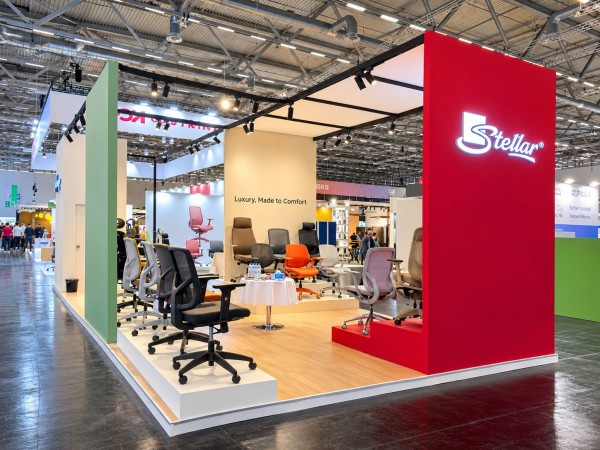
Stellar Global presented its latest office furniture range at ORGATEC Cologne 2026, held from 27th to 30th October at Koelnmesse Exhibition Centre, Germany. The showcase brought its contemporary office chair and desk designs to an international industry platform, while creating opportunities to connect with buyers, discuss commercial project requirements and explore potential business collaborations.
Foshan, Guangdong, China, 7th Nov 2026 – Stellar Global participated in ORGATEC Cologne 2026, one of the leading international exhibitions for modern office and workspace environments. At Hall 8, Stand A48, the company presented its latest furniture designs, reflecting its focus on creating products suited to the practical demands of contemporary workplaces.
The display featured a selection of office chairs and desks developed around key considerations such as user comfort, ergonomics and structural functionality. With workplace needs continuing to evolve, furniture must serve more than a visual purpose; it must also support everyday use, offer practical value and work effectively within different office settings. These considerations informed the range presented by Stellar Global at the exhibition.
The event also offered an opportunity to take these product conversations beyond the exhibition floor. Stellar Global’s team met with international buyers, business partners and industry professionals, discussing commercial office projects, customised requirements and possible applications across different workplace settings. Dedicated booth walkthroughs allowed visitors to explore the displayed range and discuss their specific project needs directly with the team.
For Stellar Global, participation at ORGATEC was also an opportunity to gain a closer understanding of changing industry expectations and engage with professionals shaping the future of office environments. Such interactions are valuable in informing product development, identifying emerging requirements and building business relationships across markets.
Speaking about the experience, Mr. Arihant Nahar, CEO, Stellar Global, said, “It was encouraging to meet people from across the industry and have meaningful conversations about what today’s workplaces need. ORGATEC gave us the opportunity to present our latest designs, hear different perspectives and discuss how our products can serve a range of commercial projects. We look forward to building on these conversations beyond the exhibition.”
Stellar Global’s participation at ORGATEC Cologne 2026 reflects its continued engagement with the international office furniture market. The company remains focused on developing its product portfolio, understanding the needs of evolving workplaces and building relationships with industry stakeholders across markets.
Personal documents, financial information, passwords, memories and personal wishes, kept in one secure place and passed on when it matters
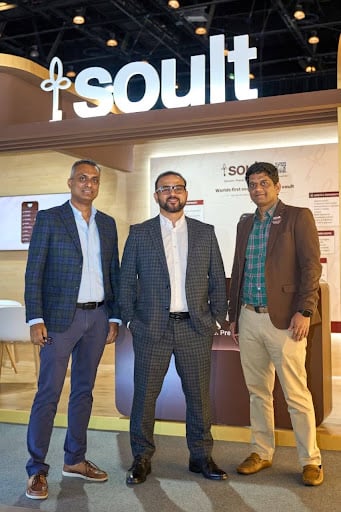
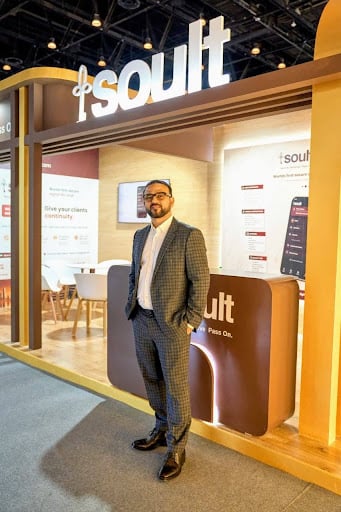
Dubai, UAE, November 7th, 2026, ZEX PR WIRE,Soult held its UAE launch on 2 November 2026 at Madinat Jumeirah, Dubai, bringing its secure digital life vault to families across the Emirates. The app is available on the App Store and Google Play.
Soult keeps the information a family needs when something happens to the person who manages it: ID and KYC documents, property and investment records, insurance policies, passwords, nominee details, medical wishes, photographs and personal messages.
What sets it apart from document storage is the handover. Users name nominees and executors in advance and decide exactly what each person can see. Soult releases only what the user chose, to the people they chose.
The UAE is a natural market for Soult. Many residents are expatriates whose documents, bank accounts and property sit in more than one country, which makes it harder for families to find and claim what is theirs.
“Families here often live a life split across countries: a house in their home country, an account in Dubai, a policy nobody else knows about,” said Mohammed Saleem, co-founder and CEO of Soult. “Soult makes sure the people you love can find all of it when it matters most.”
Data is encrypted at rest with AES-256 and in transit, with keys managed through AWS KMS. Soult is ISO 27001 and ISO 9001 certified, and no one at Soult, including support staff and administrators, can read a user’s vault.
LEXINGTON, KENTUCKY, 7th Nov 2026 – Financial strategist and seasoned entrepreneur Ferdinand J. Ruano Arroyo, MBA, RIA, has released his book, Create Your Own Endowment: How to Build Generational Wealth Like Harvard, Yale, and Princeton. The book is a valuable educational resource for American citizens from all walks of life who want to turn their assets into lasting wealth. It offers a comprehensive roadmap for investing like Ivy League institutions.
Create Your Own Endowment goes beyond short-term solutions, offering a comprehensive blueprint for growing and protecting generational wealth. It connects institutional portfolio strategies with the everyday financial decisions most Americans make, from property and taxes to investments and legacy planning. By examining the endowment strategies of Ivy League institutions and major universities, it equips readers with the knowledge and tools to make informed personal wealth management decisions. Drawing on more than four decades of professional experience, the author presents a framework that integrates portfolio construction, real estate investment, financial planning, and estate planning. Ultimately, the book helps readers incorporate principles such as diversification and disciplined financial management into their personal strategies.
Ferdinand J. Ruano Arroyo, MBA, RIA, is a respected financial professional, entrepreneur, and real estate developer deeply committed to helping people achieve long-term financial security and independence. With more than 40 years in the financial services industry, he is known for developing investment solutions that stand the test of time in any market and for a strong focus on growing and protecting wealth. In addition to his work with high-profile organizations, he serves as the chief executive officer of Private Equity Solutions LLC.
After earning a bachelor’s degree in finance from the University of South Florida and an MBA from Loyola University New Orleans, he helps people stay informed as a host on the El Juego Financiero—Special Edition program. He has also worked to create alternative pathways for aspiring homeowners who may face barriers to traditional financing.
Ferdinand J. Ruano Arroyo is available for interviews.
Title: Create Your Own Endowment: How to Build Generational Wealth Like
Wuhan, China / Timesnewswire / November 7, 2026 – From September 9 to 11, 2026, the event “Smart Manufacturing Stories, Global Voices — China Auto Valley Tour for Chinese and Foreign Cultural & Media Figures” was held in the Wuhan Economic & Technological Development Zone, Hubei Province. The event was co-organized by the CICG Academy of Translation and Interpretation and the Publicity Department of the Working Committee of the Wuhan Economic & Technological Development Zone.
Translators, writers, and media journalists from China, the United Kingdom, Egypt, Pakistan, Morocco, Russia gathered in Wuhan. They visited the Dongfeng Motor Global Innovation Center, M-Hero vehicles, the Geely Lotus Global Smart Factory, and the China Auto Valley Exhibition Center, learning about autonomous driving technology, experiencing the smart manufacturing capabilities of China Auto Valley up close, and gaining a firsthand understanding of the automotive industry’s iterative upgrading, the clustering of science and technology industries, and urban renewal and transformation.
The visitors unanimously agreed that the Wuhan Economic & Technological Development Zone has made a major transition from traditional automobile manufacturing to smart and green manufacturing. Its comprehensive industrial-chain support and strong momentum for innovation vividly demonstrate the great strength of China’s smart manufacturing. Its model of coordinated industrial and urban development provides a practical reference for industrial cities worldwide.
Stellar Global presented its latest office furniture range at ORGATEC Cologne 2026, held from 27th to 30th October at Koelnmesse Exhibition Centre, Germany. The showcase brought its contemporary office chair and desk designs to an international industry platform, while creating opportunities to connect with buyers, discuss commercial project requirements and explore potential business collaborations.
Foshan, Guangdong, China, 7th Nov 2026 – Stellar Global participated in ORGATEC Cologne 2026, one of the leading international exhibitions for modern office and workspace environments. At Hall 8, Stand A48, the company presented its latest furniture designs, reflecting its focus on creating products suited to the practical demands of contemporary workplaces.
The display featured a selection of office chairs and desks developed around key considerations such as user comfort, ergonomics and structural functionality. With workplace needs continuing to evolve, furniture must serve more than a visual purpose; it must also support everyday use, offer practical value and work effectively within different office settings. These considerations informed the range presented by Stellar Global at the exhibition.
The event also offered an opportunity to take these product conversations beyond the exhibition floor. Stellar Global’s team met with international buyers, business partners and industry professionals, discussing commercial office projects, customised requirements and possible applications across different workplace settings. Dedicated booth walkthroughs allowed visitors to explore the displayed range and discuss their specific project needs directly with the team.
For Stellar Global, participation at ORGATEC was also an opportunity to gain a closer understanding of changing industry expectations and engage with professionals shaping the future of office environments. Such interactions are valuable in informing product development, identifying emerging requirements and building business relationships across markets.
Speaking about the experience, Mr. Arihant Nahar, CEO, Stellar Global, said, “It was encouraging to meet people from across the industry and have meaningful conversations about what today’s workplaces need. ORGATEC gave us the opportunity to present our latest designs, hear different perspectives and discuss how our products can serve a range of commercial projects. We look forward to building on these conversations beyond the exhibition.”
Stellar Global’s participation at ORGATEC Cologne 2026 reflects its continued engagement with the international office furniture market. The company remains focused on developing its product portfolio, understanding the needs of evolving workplaces and building relationships with industry stakeholders across markets.
Personal documents, financial information, passwords, memories and personal wishes, kept in one secure place and passed on when it matters
Dubai, UAE, November 7th, 2026, ZEX PR WIRE,Soult held its UAE launch on 2 November 2026 at Madinat Jumeirah, Dubai, bringing its secure digital life vault to families across the Emirates. The app is available on the App Store and Google Play.
Soult keeps the information a family needs when something happens to the person who manages it: ID and KYC documents, property and investment records, insurance policies, passwords, nominee details, medical wishes, photographs and personal messages.
What sets it apart from document storage is the handover. Users name nominees and executors in advance and decide exactly what each person can see. Soult releases only what the user chose, to the people they chose.
The UAE is a natural market for Soult. Many residents are expatriates whose documents, bank accounts and property sit in more than one country, which makes it harder for families to find and claim what is theirs.
“Families here often live a life split across countries: a house in their home country, an account in Dubai, a policy nobody else knows about,” said Mohammed Saleem, co-founder and CEO of Soult. “Soult makes sure the people you love can find all of it when it matters most.”
Data is encrypted at rest with AES-256 and in transit, with keys managed through AWS KMS. Soult is ISO 27001 and ISO 9001 certified, and no one at Soult, including support staff and administrators, can read a user’s vault.
LEXINGTON, KENTUCKY, 7th Nov 2026 – Financial strategist and seasoned entrepreneur Ferdinand J. Ruano Arroyo, MBA, RIA, has released his book, Create Your Own Endowment: How to Build Generational Wealth Like Harvard, Yale, and Princeton. The book is a valuable educational resource for American citizens from all walks of life who want to turn their assets into lasting wealth. It offers a comprehensive roadmap for investing like Ivy League institutions.
Create Your Own Endowment goes beyond short-term solutions, offering a comprehensive blueprint for growing and protecting generational wealth. It connects institutional portfolio strategies with the everyday financial decisions most Americans make, from property and taxes to investments and legacy planning. By examining the endowment strategies of Ivy League institutions and major universities, it equips readers with the knowledge and tools to make informed personal wealth management decisions. Drawing on more than four decades of professional experience, the author presents a framework that integrates portfolio construction, real estate investment, financial planning, and estate planning. Ultimately, the book helps readers incorporate principles such as diversification and disciplined financial management into their personal strategies.
Ferdinand J. Ruano Arroyo, MBA, RIA, is a respected financial professional, entrepreneur, and real estate developer deeply committed to helping people achieve long-term financial security and independence. With more than 40 years in the financial services industry, he is known for developing investment solutions that stand the test of time in any market and for a strong focus on growing and protecting wealth. In addition to his work with high-profile organizations, he serves as the chief executive officer of Private Equity Solutions LLC.
After earning a bachelor’s degree in finance from the University of South Florida and an MBA from Loyola University New Orleans, he helps people stay informed as a host on the El Juego Financiero—Special Edition program. He has also worked to create alternative pathways for aspiring homeowners who may face barriers to traditional financing.
Ferdinand J. Ruano Arroyo is available for interviews.
Title: Create Your Own Endowment: How to Build Generational Wealth Like
The Aveda salon on East Bell Road offers walk-ins, appointments and Sunday hours for holiday parties, family photos and New Year’s Eve
Scottsdale, Arizona, United States, 7th Nov 2026 – With holiday parties, family gatherings and New Year’s Eve celebrations filling calendars, Bon Bon Hair Salon & Spa of Scottsdale is inviting guests to plan their holiday hair and beauty appointments early. The full-service Aveda salon, open since 2018, offers event styling, color, nails, lashes and waxing under one roof, so guests can be ready for every event of the season in one visit.
Holiday services at Bon Bon include:
Event styling and blowouts for office parties, holiday dinners and New Year’s Eve
Color refreshes, including root touch-ups, gloss and toner, highlights and balayage, using Aveda color
Brazilian Blowout smoothing for frizz-free hair through the holiday weeks
Hair extensions, including clip-ins for a one-night look (hair is ordered after a deposit, so guests should book early)
Manicures and pedicures with Dazzle Dry non-toxic polish, plus zero gravity pedicures
Lash lift and tint, brow services and waxing
Haircuts for the whole family before holiday photos, including kids’ and men’s cuts
“Holidays are when our guests want to look and feel their best, and many of them have been coming to us for years. We give every client professional, personal service and treat them like friends and family, whether they’re getting ready for a party or just want a fresh look for the new year.” said Milana Nerik, owner of Bon Bon Hair Salon & Spa of Scottsdale.
Planning tips for the season Bon Bon suggests that guests book color services one to two weeks before a big event, and schedule styling and nails within a day or two of it. Hair extensions need extra lead time because the hair is ordered in advance. Mid- to late-December appointments fill up fastest.
Holiday hours and booking Bon Bon is open Monday through Thursday 8:30 a.m. to 5 p.m., Friday 8:30 a.m. to 4 p.m. and Sunday 8:30 a.m. to 5 p.m. It is closed Saturdays. Walk-ins are welcome, and appointments can be booked online at bonbonofscottsdale.com.
About Bon Bon Hair Salon & Spa of Scottsdale Bon Bon Hair Salon & Spa of Scottsdale is a full-service Aveda hair salon and spa at 5555 E. Bell Road, Suite 8, Scottsdale, AZ 85254. Since opening in 2018, Bon Bon has offered haircuts, color, extensions, smoothing treatments, nails, lashes and waxing, plus on-site bridal hair and makeup. The salon is known for professional service with a personal touch, and many of its guests have been coming for years. Learn more at bonbonofscottsdale.com.
Kayan Holdings Limited opens its forest-backed utility token to retail and institutional participants worldwide, supported by Proof of Reserve, carbon-credit NFT infrastructure and an independent token classification.
Kayan Holding Limited today announced that the proposed listing of its Kayan Carbon Token (KYNCO2) is scheduled to commence concurrently on two reputable centralised exchanges (CEXs), GCex and P2B, on Sunday, 15 November 2026 at 5:00PM (Singapore Time Zone). Both exchanges are Europe based and accessible across the world to cater to the wide user base of Kayan. The dual-exchange launch follows the Group’s announcement on 28 October 2026 that it was advancing KYNCO2 development and targeting both venues, and gives traders and investors around the world two trading gateways into the Kayan Forest ecosystem on day one. Currently, KYNCO2 is running its IEO on GCEX (www.gcex.lt/ieo).
Dr Eddy Limantoro, Founder & Executive Director.
Kayan Group is building KYNCO2 as a practical, real-world asset (RWA). KYNCO2 is designed as a utility token and meant to complement the launch of carbon NFT which is claimable with carbon offset in the ecosystem at preferred rate within the Kayan Forest ecosystem in North and East Kalimantan, Indonesia, linking a digital asset to an on-the-ground environmental project rather than to speculation alone. These NFTs will soon be listed on the BiCO2 platform (www.bico2.org).
Listing at a glance
Token: Kayan Carbon Token (KYNCO2), utility token for Kayan ecosystem
Listing date: Sunday, 15 November 2026 (concurrent launch)
Exchanges: GCex and P2B (centralised exchanges)
Trading opens: 15 November 2026 at 5:00 PM SGT (9:00AM UTC)
This launch will speed up the ecosystem development. Simultaneous availability on GCex and P2B is intended to broaden access, deepen early market participation and give participants a choice of venue from the first day of trading.
Real utility, not just a ticker. KYNCO2 is built to fund and sustain the Kayan Forest carbon credit ecosystem across a planned 60-year project horizon. Ascent Partners Sustainability Advisory Limited independent valuation estimates the ecosystem’s potential value at up to USD 750 billion over that period. Under the tokenomics framework set out in the KYNCO2 whitepaper, up to 20% of the ecosystem’s EBITDA shall be allocated to eligible participants. Allocations are subject to the token terms, DAO governance, and applicable legal and regulatory requirements. Token releases are governed by the DAO against published criteria and tied to measurable carbon project milestones, so supply grows only as verified progress is made on the ground. As the ecosystem matures, KYNCO2 is expected to appreciate its holding value and trade on supported markets, subject to applicable laws and market conditions.
An ecosystem with global appeal. The ecosystem of approximately 225,000 hectares, is centred on Kayan Forest in North and East Kalimantan, Indonesia, giving the token a tangible environmental narrative at a time when sustainability-linked digital assets are drawing growing attention.
Transparency through Proof of Reserve. Tijarah Holding has been engaged to provide Proof of Reserve (PoR), supporting verifiable disclosure for the community and for institutions that require stronger assurance.
Carbon-credit NFT infrastructure. Onboarded in BiCO2, Kayan Group is developing carbon-credit NFTs and supporting infrastructure intended to facilitate the tracking and settlement of eligible carbon credits.
Specialist blockchain engineering partnerships. AI Green Bubble (AIGB) has been engaged for blockchain technology development, bringing dedicated technical capability to the token and its supporting systems.
Independent token classification. The National Certified Valuators Company Limited (NCDLT) has approved and certified digital asset classification standard with dual ticks – blue for verified compliance and green for environmental stewardship, together with a separate assessment of the Kayan Project’s development rights. These documents are subject to their stated scope, assumptions, qualifications and limitations and are not regulatory approval or as a fair value of the project.
Community and CSR reach. The Group’s wider programme includes collaboration with TrueFin Digital on an environmental card initiative linked to its corporate social responsibility activities.
Open to retail and institutional participants. A listing on established centralised exchanges is intended to make KYNCO2 accessible to individual traders and to institutions through familiar, widely used trading platforms.
Leadership comment
“Listing KYNCO2 on GCex and P2B on the same day is a major step in opening the Kayan ecosystem to a global audience,” said Dr Eddy Limantoro, Founder of Kayan Holdings Limited “Our priority has always been clear documentation, transparent reserves and technology that supports practical services. With our technology and carbon partners in place, we are ready to welcome retail and institutional participants to the Kayan Forest community.”
What happens next
Kayan Holdings Limited will publish trading details, including trading pairs and deposit instructions, through its official social channels ahead of the 15 November launch. Community members are encouraged to follow Kayan Group’s official website and social channels and to verify all information against official sources only.
Kayan Holdings, through Kayan Holdings Limited (Labuan, Malaysia), is developing the Kayan Forest ecosystem in North and East Kalimantan, Indonesia, and the Kayan Carbon Token (KYNCO2), a utility token intended to support service payments and carbon NFT settlement within the ecosystem.
Important notice and risk disclosure
KYNCO2 is a utility token. It is not a carbon credit, a security, a deposit or a financial product, and nothing in this release is an offer, solicitation or recommendation to buy, sell or hold any digital asset. This release is for information purposes only and is not investment, legal or tax advice.
The listing of KYNCO2 on GCex and P2B on 15 November 2026 remains subject to the finalisation of exchange arrangements, applicable compliance requirements, technical preparations and each exchange’s final approval and confirmation. Dates, venues and trading details may change.
Digital assets are highly volatile and carry a significant risk of loss, including total loss of capital. Prices can move sharply and liquidity may be limited. Availability of the token and of exchange services may be restricted in certain jurisdictions; it is each person’s responsibility to confirm that participation is lawful where they reside. Participants should do their own research and seek independent professional advice.
References to the NCDLT token classification and project assessment, to Proof of Reserve and to the carbon-credit NFT programme are subject to their respective scopes, assumptions, qualifications and limitations. They do not constitute regulatory approval and do not guarantee project value, token price or returns.
This release contains forward-looking statements, including statements about planned listings, technology development and ecosystem plans. These involve risks and uncertainties, and actual results may differ materially.
ElectionBuddy announces new voting and platform features released in November 2026, including slate voting, advanced language options, an enhanced dashboard, and improved tools for multi-division organizations.
United States, 7th Nov 2026 – ElectionBuddy, an online election management platform, has announced a series of new features and platform enhancements released in November 2026. The updates introduce new voting capabilities and administrative tools designed to give organizations greater flexibility when managing elections.
The latest features include slate voting, which allows organizations to offer predefined groups of candidates for voters to select together. This option can support elections for boards, committees, leadership teams, and other organizational groups where candidates may run as a slate.
ElectionBuddy has also expanded its language options, giving organizations more flexibility when conducting elections for multilingual voter populations. The enhanced language capabilities are intended to help administrators provide a more accessible voting experience while managing elections through the same platform.
Another significant update is an enhanced dashboard with improvements to the election administration experience. The updated dashboard is designed to make it easier for administrators to manage elections and access support throughout the process.
The November release also introduces an enhanced view for multi-division organizations. Organizations that oversee multiple properties, locations, or divisions can now gain a broader view across their organization. This functionality can be particularly useful for groups such as homeowners associations managing elections across multiple properties.
“Election administrators have different needs based on the structure of their organization and the elections they conduct,” said Dave Bodnarchuk, Co-Founder of ElectionBuddy. “These updates give organizations more flexibility in how they structure elections while making key administrative tasks easier to manage. The goal is to continue providing practical tools that support efficient, accessible, and reliable elections.”
The new features build on ElectionBuddy’s focus on election integrity, voter engagement, and reducing the administrative time required to conduct elections. The platform is designed to support organizations throughout the election process, from configuring voting options to managing voter participation and election administration.
ElectionBuddy is free to test and is free for elections with up to 20 voters. The November 2026 updates represent the latest enhancements to the platform as the company continues developing tools for organizations with a range of election structures and administrative requirements.
About ElectionBuddy
ElectionBuddy is an online election management platform designed to help organizations conduct secure and engaging elections. ElectionBuddy helps organizations maintain election integrity, increase voter engagement, and reduce the administrative time required to manage elections. The platform is free to test and is free for elections with up to 20 voters, so you can try before you buy and test until you’re happy.